
Warehouse Management System (WMS) Process Flow: A Step-by-Step Guide
A warehouse management system only delivers results when it follows a clear process flow — a defined path that every item takes from the moment it arrives to the moment it ships. Get that flow right and you cut errors, speed up dispatch, and gain real-time visibility. Get it wrong, or leave it undefined, and even the best software creates confusion on the floor.
This guide breaks down the complete WMS process flow stage by stage, then shows you how to build your own — starting with the operation you already run today.
▶ Watch our video: Warehouse Management System (WMS)
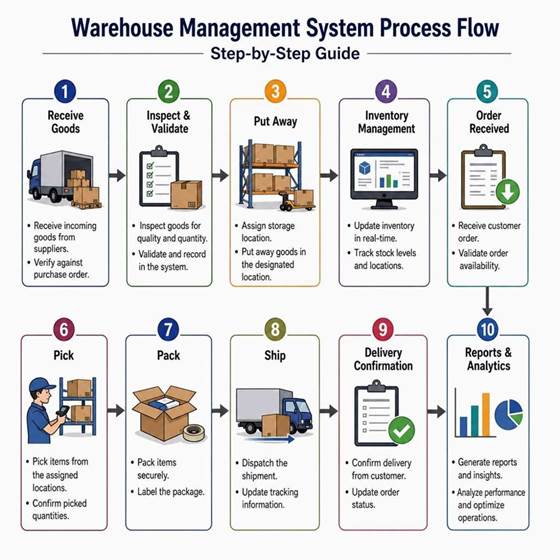
The WMS Process Flow: 10 Stages Explained
Most warehouses follow the same core sequence. A Warehouse Management System optimises each stage and passes clean data to the next.
- 1. Receive Goods: Incoming stock arrives and is verified against the purchase order — quantities, condition, and batch or serial details are captured on arrival.
- 2. Inspect & Validate: Goods are checked for quality and quantity, and any discrepancy is recorded in the system before the stock enters your inventory.
- 3. Put Away: The WMS assigns the best storage location for each item and directs staff straight to it, based on size, weight, and how fast the item moves.
- 4. Inventory Management: Stock is updated in real time, with live stock levels and locations tracked continuously — the backbone of accurate inventory visibility.
- 5. Order Received: A customer order comes in and the system validates stock availability before releasing it for fulfilment.
- 6. Pick: The WMS generates an optimised pick path and directs the picker to each location in sequence, then confirms the picked quantities by scan.
- 7. Pack: Items are packed securely and the package is labelled — a final scan confirms the right products and counts are going out.
- 8. Ship: The shipment is dispatched, carrier labels are generated, and tracking information is updated automatically.
- 9. Delivery Confirmation: Delivery is confirmed and the order status is updated, closing the loop with the customer.
- 10. Reports & Analytics: The system generates reports and insights so you can analyse performance and keep optimising the operation.
How to Build Your Own WMS Process Flow
A great diagram is only the starting point. Here is how to turn it into a working flow for your specific warehouse.
Step 1: Map Your Current Warehouse Operations
Before you set up a WMS, map how work happens today. This keeps you from building a workflow that looks good on paper but fails on the floor. Walk through each main workflow and record:
- Where stock enters the site
- Who receives and checks goods
- How items are labelled
- Where products are stored
- How orders are sent to the floor
- How pickers find and confirm items
- How packing and shipping are done
- Where errors, delays, or manual workarounds happen
Talk to supervisors, receivers, pickers, packers, inventory control teams, and customer service staff — each group sees a different part of the job, and the gaps between them are where most problems hide.
Step 2: Define Each Stage and Its Rules
Using the 10 stages above as your template, write down the rules for each one: how goods are inspected, which storage zones suit which products, your stock-rotation method (FIFO or FEFO), and how orders are prioritised. Clear rules are what let the software make the right decision automatically.
Step 3: Add Barcode and RFID Data Capture
Replace manual counting and typing with scanning. Barcode and RFID data capture links every physical move to a digital record, so your inventory stays accurate in real time and picking errors drop sharply.
Step 4: Integrate with ERP, E-commerce and 3PL
Connect the WMS to your ERP, online store, and third-party logistics (3PL) partners so orders, stock levels, and dispatch data flow automatically — no double entry, no mismatched numbers. If you run automated equipment, a Warehouse Control System coordinates the machines with your flow.
Step 5: Test, Train, and Optimize
Run the flow with real orders, train each team on their part, then use the reports from Stage 10 to spot bottlenecks and refine. A WMS process flow is not a one-time setup — the best operations review and improve it continuously.
Final Takeaway
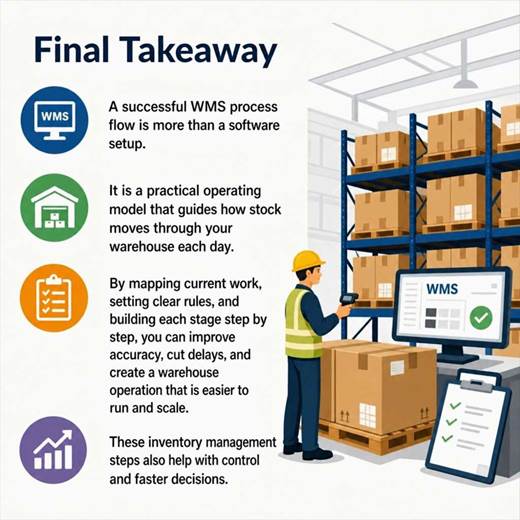
A successful WMS process flow is more than a software setup. It is a practical operating model that guides how stock moves through your warehouse each day. By mapping current work, setting clear rules, and building each stage step by step, you can improve accuracy, cut delays, and create a warehouse operation that is easier to run and scale. These inventory management steps also give you tighter control and faster decisions.
Want help designing the right process flow for your warehouse? Explore Brilliant Info Systems Warehouse Management System or talk to our team for a walkthrough tailored to your operation.
Frequently Asked Questions
What is a WMS process flow, and why does it matter?
A WMS process flow is the end-to-end path your warehouse management system supports, from inbound receipt to outbound shipping and returns. It links physical work with digital records, so inventory moves are tracked in real time. A full flow usually covers receiving, inspection, put-away, storage and tracking, replenishment, order allocation, picking, packing, shipping, returns, and reporting. Well-built flows cut errors and manual work while improving visibility, accuracy, productivity, and customer service.
What should we do before setting up a WMS?
Map how work happens today and involve the people who do it. Walk through each workflow and record where stock enters, who receives and checks goods, how items are labelled, how products are stored, how orders reach the floor, how picks are made and confirmed, and where delays or manual workarounds occur. This real-world picture is the foundation of a flow that works on the floor, not just on paper.
How long does it take to implement a WMS process flow?
It varies with warehouse size and complexity, but mapping and defining the flow usually takes a few weeks, followed by configuration, integration, and staff training. Starting with a clear process map — as in Step 1 — is what keeps the timeline short and the rollout smooth.
Can the process flow scale as my business grows?
Yes. A well-designed WMS process flow is built to absorb more SKUs, orders, and channels without breaking. As volumes rise you can add automation — barcode/RFID, conveyors, or ASRS — onto the same underlying flow.