
Integrating UWB and AoA Data with WMS, ERP, and IoT Dashboards
A real time location system is only as valuable as the decisions it drives. UWB and Bluetooth AoA can pinpoint an asset to the centimetre, but if that location data stays trapped in its own app, it is just a dot on a map. The real payoff comes when you feed it into the systems your business already runs on — your WMS, your ERP, and your IoT dashboards — so position becomes action.
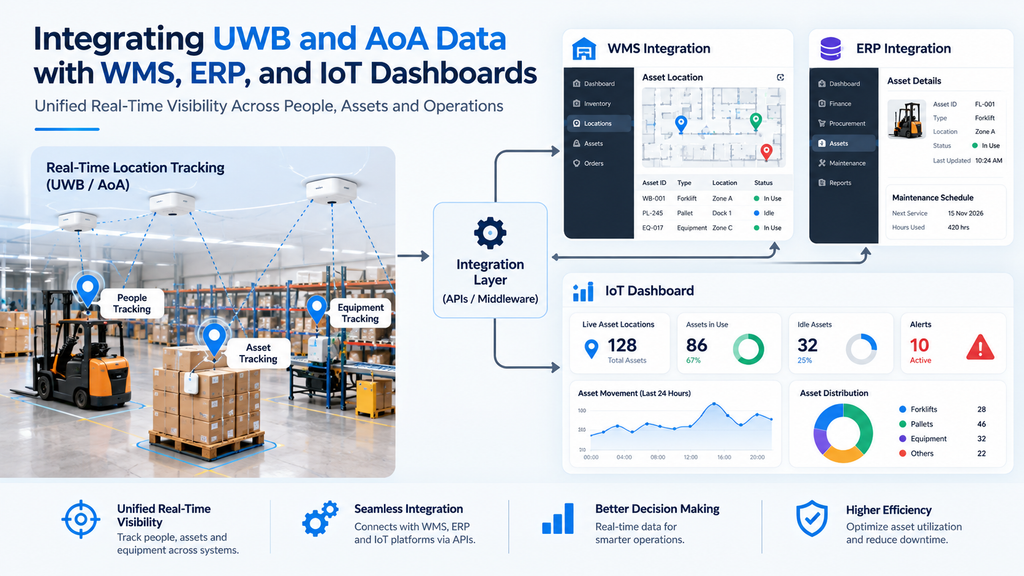
This guide explains how integrating UWB and AoA data with WMS, ERP, and IoT dashboards works, why it matters, and how to connect real time positioning to the business processes that depend on it.
▶ Watch: Brilliant Info Systems on YouTube
What You’ll Learn
- Why location data needs to leave the RTLS app
- How the integration actually works
- What WMS, ERP, and IoT dashboards do with position data
- Integration methods and best practices
- Common challenges and how to avoid them
Why Location Data Shouldn’t Stay in a Silo
UWB and AoA positioning technology generates a constant stream of devices data — where every tagged asset, vehicle, or person is, updated many times a second. On its own, that stream answers one question: “where is it?” The systems that run your operation answer the others: what is it, what should happen next, and what does it cost.
When a positioning system is connected to those business functions, the location becomes context. A pallet arriving at a dock can update stock levels; a tool entering a zone can log machine time; a vehicle crossing an electronic fence can trigger the next task. Without integration, staff re-key the same information into several systems, errors creep in, and the real time advantage is lost. Good RTLS and RFID solutions are built to share their data, not hoard it.
How the Integration Works
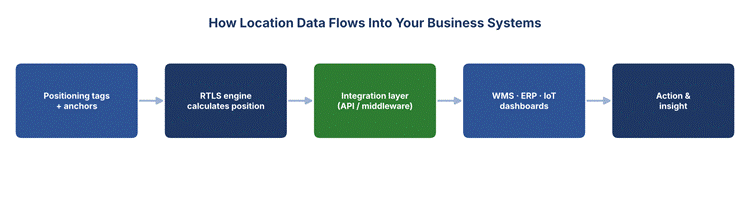
The flow from a positioning tag to a business system follows a clear path:
- Capture: UWB or AoA anchors read each tag and the RTLS engine calculates its position with high positioning accuracy.
- Translate: An integration layer — usually an API or middleware — converts raw coordinates into events the other systems understand, such as “asset X entered Zone 3.”
- Deliver: Those events are pushed to the WMS, ERP, or IoT dashboard in real time, where they trigger updates and actions.
- Act: Each system does its job — updating stock, posting a transaction, or refreshing a live view — without anyone typing a thing.
The integration layer is the key piece. It shields each business system from the firehose of raw positioning data and sends only the meaningful events, built on reliable IoT sensors and gateways across the site.
What Each System Does With Location Data
Each destination uses position differently. Here is how the three main targets put UWB and AoA data to work:
| System | What It Does With Position Data |
| WMS | Confirms put-away and picking locations, speeds stock moves, cuts search time. |
| ERP | Posts inventory, asset, and labour transactions automatically against live location. |
| IoT dashboard | Shows a live map and KPIs so managers see the whole operation at a glance. |
Warehouse Management System (WMS)
A WMS cares about where stock is and how it moves. Feeding it real time positioning turns a best-guess location into a verified one: the system knows the exact bin a pallet landed in and the fastest route to pick it. This sharpens inventory visibility and asset tracking and removes the manual scans that slow a warehouse down.
Enterprise Resource Planning (ERP)
An ERP system is the financial and operational backbone — enterprise resource planning erp ties together inventory, orders, and accounting. Pushing location events into ERP software means stock movements and asset usage post themselves, keeping the books accurate without manual entry. Whether you run a traditional on-premise suite or a cloud ERP, a clean ERP integration is what connects the warehouse floor to finance, and links on to the order management system that fulfils customer demand. The same connection supports wider business processes, from supply chain management to reporting.
A modern ERP spans many business functions beyond stock — finance, procurement, human resources, and customer relationship management crm all live under one roof. Location data is most relevant to the modules that touch physical goods and people, but because everything is connected, a single accurate position update can ripple through to inventory valuation, labour records, and customer-facing promises. That is why the quality of the integration, and the choice of ERP vendor and connector, matters so much: it decides how cleanly real-world movement becomes a trusted business record.
IoT Dashboards
An IoT dashboard is where people actually watch the operation. Location data makes it live: a floor-plan map of every asset, zone occupancy, and alerts the moment something crosses an electronic fence. A good cloud-based dashboard turns raw devices data into clear KPIs, much like a customer dashboard does for a service, and sits alongside metrics such as OEE for a complete operational picture.
Integration Methods and Best Practices
There is more than one way to connect an RTLS to your business systems, and the right choice depends on your stack and your ERP vendor:
- REST APIs: The most common route — the RTLS exposes an API that your WMS, ERP, or dashboard calls for live position and events.
- Middleware / event bus: A broker (such as MQTT) streams position events to any system that subscribes, ideal when several systems need the same data.
- Native connectors: Some RTLS platforms ship pre-built connectors for popular ERP systems and WMS products, cutting integration time.
- Database or file sync: For less time-critical needs, position summaries can be written to a shared database on a schedule.
Whichever method you pick, a few practices keep the integration healthy:
- Send events, not noise: Translate raw coordinates into meaningful events at the integration layer so business systems are not flooded with real time position updates they cannot use.
- Map your data model: Make sure an asset ID in the RTLS matches the same item in the ERP and WMS, so records line up cleanly.
- Secure the pipeline: Use authenticated, encrypted connections, especially for cloud based and cloud ERP destinations.
- Plan for scale: Choose a method that copes as tag counts and update rates grow.
Common Challenges and How to Avoid Them
Integration projects stumble in predictable ways. Knowing them in advance saves time:
- Data overload: Pushing every raw coordinate into an ERP will overwhelm it. Filter to events at the integration layer.
- Mismatched IDs: If the positioning tag and the ERP record use different identifiers, the data cannot be matched. Agree a single ID scheme early.
- Latency expectations: Not every system needs millisecond updates; match the delivery speed to what each business function actually requires.
- Vendor lock-in: Prefer open APIs so you are not tied to one positioning system or ERP vendor for the connection.
Handled well, these are all straightforward. The reward is an operation where real time location flows automatically into every tool that needs it — from the warehouse floor to finance and the boardroom dashboard.
Conclusion
UWB and Bluetooth AoA deliver precise real time positioning, but the value is unlocked only when that data flows into the systems that run your business. Integrating it with your WMS sharpens inventory and picking; with your ERP it automates transactions and accounting; and on an IoT dashboard it gives everyone a live, shared view. With the right integration layer and a few sound practices, location stops being a dot on a map and becomes the trigger for action across the whole operation.
Brilliant Info Systems builds RTLS deployments that integrate cleanly with your WMS, ERP, and IoT dashboards. Explore our ERP integration and RTLS solutions, or talk to our team to connect your location data to the systems that matter.
Frequently Asked Questions
Why integrate UWB and AoA data with a WMS or ERP?
Because location becomes useful only when it drives action. Integrating it means stock moves, asset usage, and labour post automatically to the systems that run your business — removing manual data entry and keeping records accurate in real time.
How is RTLS data sent to other systems?
Usually through an API or middleware layer that converts raw coordinates into events like “asset entered Zone 3,” then pushes those events to the WMS, ERP, or IoT dashboard. Some platforms also offer native connectors for common ERP systems.
Does it work with cloud ERP systems?
Yes. Cloud-based and cloud ERP platforms integrate the same way through secure APIs. The main requirement is an authenticated, encrypted connection and a shared ID scheme so records match across systems.
What is the integration layer and why does it matter?
It is the middleware between the RTLS and your business systems. It filters the firehose of positioning data down to meaningful events, maps IDs between systems, and keeps each destination from being overwhelmed — making it the key to a stable integration.