
Geofencing with RTLS: Restricted Zones and Movement Alerts
Knowing where an asset or person is in real time is powerful. Knowing the instant they cross into a place they should not be is what prevents accidents, theft, and costly delays. That is exactly what geofencing adds to a real time location system. By drawing virtual boundaries on a map, you turn passive tracking into active control — the system automatically watches every zone and raises an alert the moment a rule is broken.
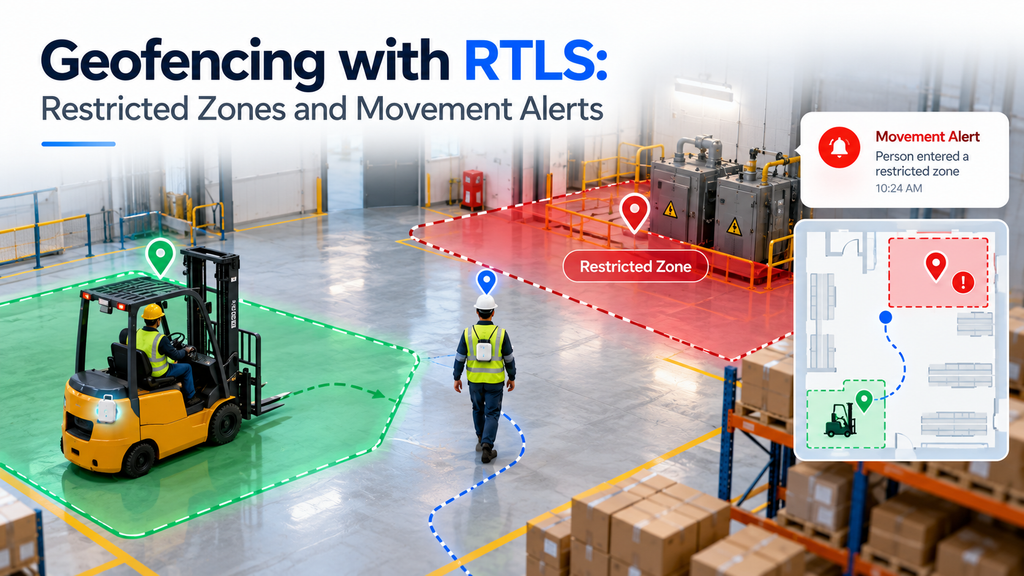
This guide explains geofencing with RTLS — what it is, how geofencing works, the types of restricted zones and movement alerts you can set up, and where it delivers the most value. Whether you are protecting a hazardous area or logging technician arrivals at customer sites, geofencing turns location data into action.
▶ Watch: Brilliant Info Systems on YouTube
What You’ll Learn
- What geofencing with RTLS actually is
- How geofencing works, step by step
- Types of zones and movement alerts
- Real-world use cases
- RTLS geofencing vs GPS geofencing
What Is Geofencing with RTLS?
A geofence is a virtual boundary drawn around a real-world area — a room, an aisle, a loading dock, a whole yard. With RTLS, the system knows the live position of every tagged asset, vehicle, or person, and compares it against those geofence boundaries many times a second. When a tag crosses a line, the system automatically reacts: it can log the event, flag it on a dashboard, or trigger an alert to the right people.
Unlike a physical barrier, these virtual boundaries cost nothing to move. You can redraw configured zones in software as your layout changes, create temporary zones around maintenance work, or set different rules for different times of day. That flexibility, combined with real time visibility, is what makes RTLS geofencing so useful indoors, where GPS signals cannot reach.
How Geofencing Works, Step by Step
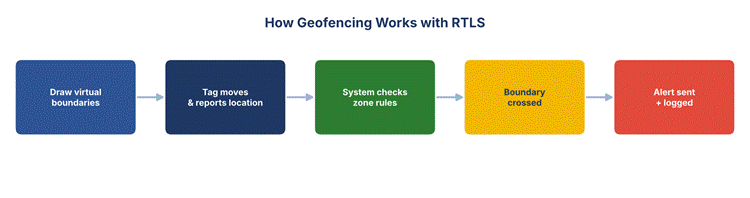
The mechanics are straightforward once the RTLS is in place:
- Step 1 – Draw the zones: On the floor-plan map, you draw virtual boundaries around the areas that matter — restricted areas, safe zones, storage bays, or dock approaches.
- Step 2 – Set the rules: For each zone you define what should happen on entry and exit — who is allowed in, what counts as a violation, and who gets notified.
- Step 3 – Track movement: Tags continuously report their location data to the system, which checks every reading against the geofence boundaries.
- Step 4 – Detect the crossing: The moment a tag crosses a line — a person steps into a restricted zone, or vehicles enter a dock — the system registers the enter exit event.
- Step 5 – Act on it: The system automatically triggers an alert, logs the event with a timestamp, and updates the live dashboard.
Because everything runs on live IoT sensors and anchors, the whole loop — from movement to alert — happens in seconds.
Types of Geofence Zones
Not every zone does the same job. Most deployments mix a few kinds:
Restricted Zones
These mark restricted areas people or vehicles should not enter — around heavy machinery, high-voltage equipment, or hazardous storage. Entry triggers an immediate safety alert. This pairs naturally with anti-collision systems to keep people and moving equipment apart.
Safe Zones
The opposite of a restricted zone: an area where a tag is expected to stay. If it leaves, the system raises exit alerts — useful for high-value assets that should never leave the building, or for lone workers who should remain in a designated area.
Transit and Dock Zones
Zones around entrances, docks, and yards record arrival and departure automatically. They are ideal for logging when vehicles enter or leave, supporting faster yard management and smoother forklift traffic.
Types of Movement Alerts
Once zones are defined, the alerts do the work. Common options include:
| Alert Type | Triggers When… |
| Entry alert | A tag enters a restricted zone it should not be in. |
| Exit alert | A tag leaves a safe zone where it should have stayed. |
| Dwell alert | A tag stays in a zone longer than allowed. |
| Arrival / departure | A vehicle or person reaches or leaves a dock or site. |
| Idle / no-show | An expected tag does not appear in a zone on time. |
Alerts can be sent by on-screen pop-up, email, or SMS, and every event is stored so you have a full history of entry and exit activity for review and compliance.
Real-World Use Cases
Geofencing turns location data into measurable results across many settings:
- Worker safety: Wearable tags warn staff — and supervisors — the moment someone enters a dangerous area, strengthening labor safety and management.
- Asset protection: High-value assets are kept inside safe zones; any unauthorised move triggers an alert before they leave the site.
- Yard and dock control: Automatic arrival times and departure logs speed up loading and cut waiting, improving overall inventory visibility.
- Service verification: At customer sites, geofencing records technician arrivals and time on site automatically — no manual check-in needed.
In each case, the pattern is the same: the system automatically detects a crossing and acts, so staff do not have to watch a screen all day.
Benefits of Geofencing with RTLS
Adding geofencing to a location system changes it from a tool you watch into one that works for you. The main gains:
- Proactive safety: Instead of reviewing an incident after it happens, the system warns people before they reach a hazard, cutting the risk of injury in restricted areas.
- Less manual work: Entry and exit events are logged automatically, so no one has to stand at a gate or fill in a sign-in sheet. Arrival times and departure records build themselves.
- Faster response: The moment a boundary is crossed, the right person is notified, so problems are caught in seconds rather than discovered hours later.
- Stronger security: Safe zones around valuable assets mean any unauthorised movement is flagged before the item can leave the site.
- Better records: Every crossing is timestamped and stored, giving a clean audit trail for safety reviews, compliance, and service verification at customer sites.
Together these turn raw location data into everyday operational value — fewer incidents, less paperwork, and clearer accountability.
Best Practices for Setting Up Geofences
A geofencing setup is only as good as its design. A few practical rules help it work well from day one:
- Start with the real risks: Map your most important restricted areas and safe zones first — hazards, high-value storage, and busy vehicle routes — rather than fencing everything at once.
- Match zone size to accuracy: Very small configured zones need high-accuracy technology like UWB; larger zones can use BLE. Draw boundaries your system can actually resolve.
- Avoid alert overload: Set sensible rules so the system only triggers an alert when it truly matters. Too many false alerts and people start ignoring them.
- Route alerts to the right people: A safety breach, a dock arrival, and an asset leaving its zone should each reach the person who can act on it.
- Review and refine: Check how geofencing works in practice after a few weeks, and adjust boundaries and rules as the site and its traffic change.
RTLS Geofencing vs GPS Geofencing
Geofencing is often associated with GPS — for example, a delivery app that knows when a van reaches a street. GPS works well outdoors, but GPS signals are weak or unavailable inside buildings, and their accuracy is measured in metres, not centimetres.
RTLS geofencing is built for indoor environments. Using technologies like UWB and BLE, it delivers far tighter accuracy, so a zone can be as small as a single bay or machine. For outdoor yards, many systems combine both — GPS for the open areas and RTLS for the precise indoor zones — all on one RTLS and RFID platform. The result is seamless real time visibility whether a tag is in the warehouse or the yard.
Conclusion
Geofencing is what turns an RTLS from a map into a guardian. By drawing virtual boundaries and setting entry and exit rules, you give the system the power to watch every restricted zone and safe zone around the clock, and to raise movement alerts the instant something is wrong. From worker safety to asset protection and automatic arrival and departure logging, geofencing delivers real time control that manual checks never could.
Brilliant Info Systems designs RTLS deployments with geofencing, restricted zones, and movement alerts tailored to your site. Explore our RTLS solutions or talk to our team to plan a setup that keeps your people and assets safe.
Frequently Asked Questions
What is a geofence in an RTLS?
A geofence is a virtual boundary drawn around an area on the floor-plan map. The RTLS compares each tag’s live location against these geofence boundaries and reacts — logging the event or raising an alert — whenever a tag crosses one.
How does geofencing trigger an alert?
Tags continuously report their location data. When a reading shows a tag has crossed a zone boundary — an entry or exit — the system automatically triggers an alert by dashboard, email, or SMS, and logs the event with a timestamp.
Can I use geofencing indoors?
Yes — that is where RTLS geofencing shines. Because it does not rely on GPS signals, it works inside buildings where GPS fails, and with UWB or BLE it is accurate enough to fence a single machine or bay.
Can zones be changed later?
Easily. Virtual boundaries are defined in software, so you can move, resize, or add configured zones at any time — including temporary zones around maintenance or seasonal changes — without touching any hardware.
What is the difference between a restricted zone and a safe zone?
A restricted zone raises an alert when a tag enters it; a safe zone raises an alert when a tag leaves it. Many sites use both — keeping people out of hazards and assets inside secure areas.