
Running an RTLS Pilot and Acceptance Tests Before You Buy: What to Test in an RTLS Demo
A real time location system is a serious investment, and the glossy demo in a vendor’s lab rarely matches the messy reality of your own building — with its metal racking, thick walls, and constant movement. That is why a pilot and a clear set of acceptance tests matter. Before you buy, you want proof that the system performs on your site, against your business requirements, not just on a slide.
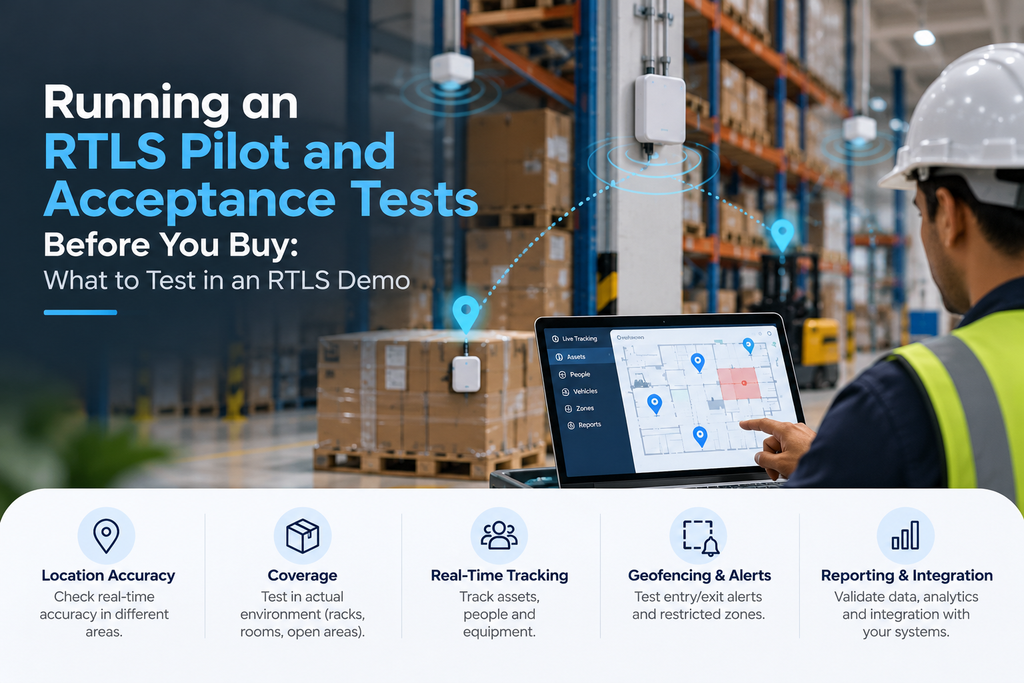
This guide explains how to run an RTLS pilot and what to test in an RTLS demo — from accuracy and coverage to alerts and integration — so you can make a confident, long term decision backed by evidence rather than promises.
▶ Watch: Brilliant Info Systems on YouTube
What You’ll Learn
- Why you should pilot before you buy
- Setting acceptance criteria tied to business requirements
- The pilot process, step by step
- What to test in an RTLS demo — the full checklist
- How to test accuracy and coverage properly
- Common pitfalls to avoid
Why Pilot Before You Buy?
Modern real time location systems vary widely in how they behave outside the lab, and every vendor’s RTLS looks flawless in a controlled demo. Your warehouse, hospital, or factory is not a controlled environment. Signals bounce off metal, walls block line of sight, forklifts move through zones, and people carry tags into corners the demo never covered. A pilot puts the system through real conditions on a small scale before you commit budget across the whole site.
The goal of a pilot is simple: prove that the system meets your needs, or reveal that it does not — while the stakes are still low. A well-run pilot answers the only question that matters: will this rtls solution deliver reliable location intelligence where I actually need it? Running it well protects you from an expensive mistake and gives you leverage in negotiations.
Start With Acceptance Criteria
You cannot judge a pilot without a yardstick. Before any hardware is installed, write down your acceptance criteria — the specific, measurable conditions the system must meet to pass. Vague goals like “good accuracy” lead to arguments; clear criteria like “room level accuracy in every ward, 95% of the time” lead to decisions.
Tie every criterion back to a real business requirement. If the aim is staff safety, the test is whether an alert fires the instant someone enters a hazardous zone. If it is asset tracking of medical equipment, the test is whether you can find a specific pump on the live map within seconds. Good acceptance criteria describe the outcome you are buying, not the technology.
Typical acceptance criteria cover the required accuracy (centimetre, room level, or zone), the areas that must be covered, alert response times, and how cleanly the software meets and integrates with your existing systems.
The RTLS Pilot Process, Step by Step
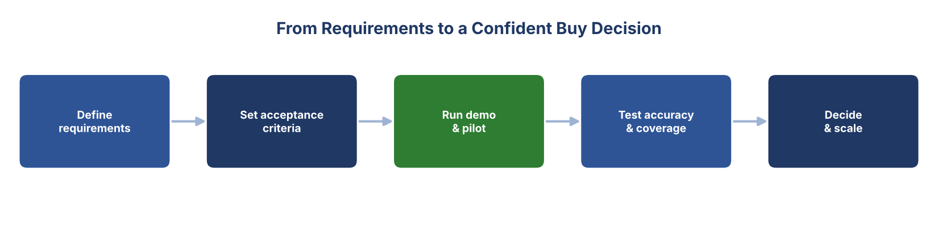
A structured pilot keeps everyone honest and makes the result easy to judge:
- Define requirements: Agree what the system must achieve and in which areas, based on your business requirements.
- Set acceptance criteria: Turn those requirements into measurable pass/fail tests everyone signs up to.
- Run the demo and pilot: Install a small set of anchors and rtls tags in a representative area and run the system in real conditions.
- Test accuracy and coverage: Measure performance against the criteria with repeatable, documented system testing.
- Decide and scale: Compare results to the criteria, then expand, adjust, or walk away — with evidence either way.
Choose a pilot area that is genuinely representative: include the toughest corner, not just the easy open floor. Testing only the best spot guarantees a happy demo and a disappointing rollout.
What to Test in an RTLS Demo
Use a consistent checklist so you compare vendors fairly. These are the areas worth scoring in any RTLS pilot:
| What to Test | What “Pass” Looks Like |
| Accuracy | Position matches reality to the level you need (centimetre or room level). |
| Coverage | No blind spots — tags are located everywhere they must be. |
| Alerts | Zone and movement alerts fire reliably and fast. |
| Integration | Software meets and connects to your ERP, WMS, or other systems. |
| Battery life | Tag battery performance matches the vendor’s claims. |
| Usability | Staff can read the live map and act without heavy training. |
Score each area against your acceptance criteria rather than a gut feeling. A simple pass/fail per row, repeated for each vendor, turns a confusing choice into a clear comparison.
How to Test Accuracy
Accuracy is the number one thing buyers care about — and the easiest to fake in a demo. To test it honestly, place a tag at known, marked positions around the pilot area and compare what the live map reports against where the tag really is. Repeat at many points, including difficult spots near metal and walls, and record the error at each one.
Be clear about what level you need. Not every use case needs centimetre precision; many need only room level or zone accuracy. UWB BLE choices matter here: UWB delivers the tightest accuracy, while BLE and wi fi trade precision for lower cost. Different rtls technologies also behave differently as signal strength drops near obstructions, so test at the edges, not just the centre. Our UWB tracking and BLE tracking pages compare the options.
How to Test Coverage
Coverage is about gaps. A system can be highly accurate where it works and still fail if there are blind spots. To test coverage, walk a tag through the entire pilot area — every aisle, corner, doorway, and stairwell that matters — and watch the live map the whole time. Any point where the tag disappears, jumps, or freezes is a coverage gap to flag.
Pay special attention to the edges of the space and areas behind large metal objects, which are the usual culprits. Good coverage is what delivers true real time visibility; without it, inventory visibility and alerts become unreliable exactly where you need them most. Document every gap so the vendor can address it before you scale.
Don’t Forget Integration and Everyday Use
A system that tracks perfectly but cannot share its data is only half a solution. During the pilot, test that the rtls system feeds location data into the tools your team already uses, and that the software meets your reporting and alerting needs. Confirm the platform runs on your infrastructure and connects through reliable IoT sensors and gateways.
Equally important is everyday usability. Put the live map in front of the people who will actually use it — floor staff, supervisors, nurses — and see whether they can find what they need without a manual. A powerful system no one can operate will not deliver value over the long term.
Common Pitfalls to Avoid
A few mistakes repeatedly undermine RTLS pilots:
- Testing only the easy area: A pilot in the best corner proves nothing about the hard ones.
- No written criteria: Without acceptance criteria agreed up front, “pass” becomes a matter of opinion.
- Ignoring real conditions: Test with the racking full, the machines running, and people moving — not on a quiet Sunday.
- Skipping integration: Confirm the data actually reaches your other systems, not just the vendor’s dashboard.
- Forgetting the long term: Check battery life, support, and how easily the system scales before you commit.
Who Should Be Involved in the Pilot
An RTLS pilot is not just an IT exercise. The people who will live with the system every day need a voice in judging it, or you risk buying something that looks good on paper but fails in practice. A strong pilot team usually brings together a few perspectives.
- Operations staff: The supervisors, floor workers, or nurses who will use the live map daily — they judge usability better than anyone.
- IT and integration: The team that owns the systems the rtls solution must connect to, who can confirm the software meets your technical standards.
- Facilities / safety: The people responsible for the building and for staff safety, especially where alerts protect against hazards.
- A decision owner: One person accountable for comparing results to the acceptance criteria and making the final call.
Involving these groups early also smooths the eventual rollout, because the people affected have already seen the system work and helped shape the decision.
Turning Pilot Results Into a Decision
When the pilot ends, resist the urge to decide on impressions. Go back to the acceptance criteria you wrote at the start and score the system against each one, pass or fail, using the data you recorded. A system that hits your accuracy and coverage targets in the hard areas — not just the easy ones — is a genuine pass.
If a vendor falls short on one or two points, that is not always a rejection; it may be fixable with more anchors, better placement, or a software change. The pilot’s value is that it surfaces these issues while you still have room to negotiate and before you have paid for a full deployment. Document everything, share the scores with your pilot team, and let the evidence — not the sales pitch — drive the final choice. That is how a pilot protects a long term investment.
Conclusion
Buying an RTLS on the strength of a lab demo is a gamble; running a pilot with clear acceptance tests is how you remove the risk. Define your requirements, turn them into measurable criteria, and test accuracy, coverage, alerts, integration, and usability in your own building under real conditions. Do that, and the buy decision makes itself — backed by evidence, not a sales pitch.
Brilliant Info Systems runs structured RTLS pilots and acceptance tests so you can see the results on your own site before you commit. Explore our RTLS and RFID solutions or talk to our team to set up a pilot built around your requirements.
Frequently Asked Questions
How long should an RTLS pilot run?
Long enough to capture real, varied conditions — often a few weeks. A short demo shows the system working once; a pilot over several weeks reveals how it behaves across shifts, busy periods, and changing layouts, which is what your buy decision should rest on.
What is the most important thing to test?
Accuracy and coverage together. Accuracy tells you how precisely the system locates a tag; coverage tells you whether it works everywhere it must. Both are tested against written acceptance criteria tied to your business requirements.
Should I pilot more than one technology?
If you are unsure whether you need centimetre precision, piloting both UWB and BLE on the same site is worthwhile. It shows the real-world difference in accuracy and cost for your specific environment, rather than relying on spec sheets.
What should the acceptance criteria include?
Measurable targets for accuracy (centimetre, room level, or zone), the areas that must be covered, alert response times, battery life, and how well the software meets and integrates with your existing systems. Each should trace back to a business need.