
Planning Anchor Placement for Indoor Tracking
You can buy the best anchors and tags on the market, but if the anchors are placed badly, your indoor tracking will never be accurate. In any real time location system, where you mount the anchors matters just as much as the technology inside them. Good planning anchor placement for indoor tracking is the difference between a system that pinpoints an asset to the right bay and one that drifts by several metres.
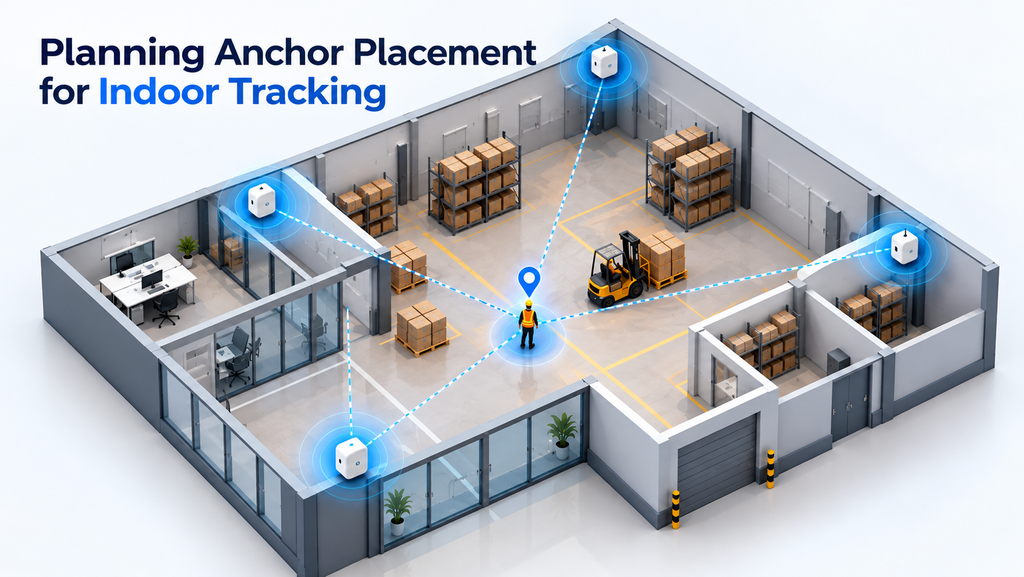
This guide walks through how to plan anchor placement properly — the geometry, the coverage, the height, and the common mistakes — so your indoor positioning system delivers high accuracy from day one.
▶ Watch: Brilliant Info Systems on YouTube
What You’ll Learn
- Why anchor placement decides accuracy
- The core rules: geometry, height, and coverage
- A 5-step planning process
- Common mistakes to avoid
- How different positioning technologies affect placement
Why Anchor Placement Decides Accuracy
An anchor is a fixed reference point. The location system works out where a tag is by combining signals from several anchors — either by measuring distance (Time of Flight) or the angle of arrival of the signal. In both cases, the maths depends entirely on the anchors being in good positions relative to each other and to the area you want to cover.
Think of it like GPS. Satellites spread across the sky give a sharp position fix; satellites bunched together in one corner give a vague one. Indoor anchors work the same way. Spread them well around the space and the system calculates a precise, stable position. Cluster them, or leave gaps, and positioning accuracy falls apart — no matter how good the hardware is.
The Core Rules of Anchor Placement
Three principles sit at the heart of every good design: geometry, height, and coverage.
1. Geometry: Spread Anchors Around the Edges
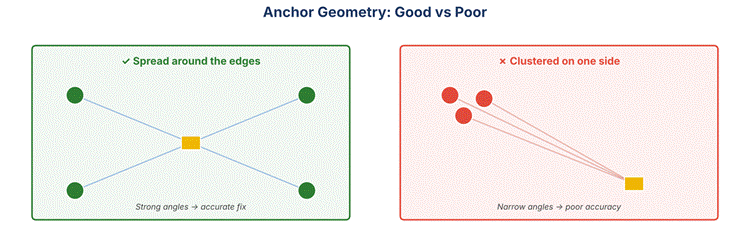
The angles between anchors matter. When anchors surround the tracking area — along the walls and corners rather than bunched in the middle or on one side — the lines to any tag meet at strong, wide angles, and the position fix is sharp. When anchors are clustered close together, the angles become narrow and small errors get magnified into large position errors. As a rule, place anchors around the perimeter of each zone so every point is “seen” from several directions.
2. Height: Mount High and Consistent
Anchors are usually mounted high — typically 3 to 4 metres — on walls, pillars, or the ceiling. Height gives each anchor a clearer line of sight over racking, machinery, and people, all of which block or reflect signals in busy indoor environments. Keeping anchors at a consistent height also simplifies the system’s 3D calculations. Aim for a clear, unobstructed view between anchors and the area below.
3. Coverage: Overlap, With No Blind Spots
Every point a tag can reach must be within range of enough anchors at once — generally three or more for a reliable fix. The practical way to achieve this is overlapping coverage “cells”: anchors are spaced so their ranges overlap, leaving no gaps where tracking drops out. Pay special attention to edges, corners, doorways, and areas behind large metal objects, which are the usual culprits for blind spots.
A 5-Step Anchor Placement Planning Process
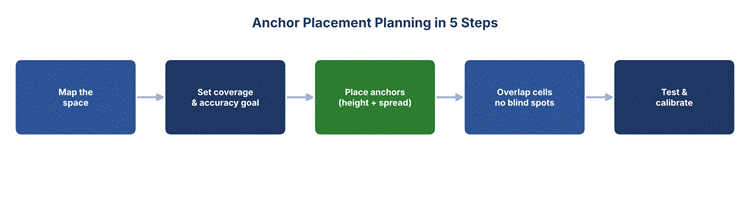
A repeatable process keeps a deployment on track:
- Step 1 – Map the space: Start with a floor plan. Mark walls, racking, machinery, doorways, and any metal structures that could block signals.
- Step 2 – Set your goal: Decide the accuracy you need and the zones that must be covered. Tracking forklifts across a yard needs different density than tracking tools at a workstation.
- Step 3 – Place the anchors: Position anchors around the perimeter of each zone, at a consistent height, spread for good geometry.
- Step 4 – Check coverage: Confirm every point is within range of at least three anchors, with overlapping cells and no blind spots.
- Step 5 – Test and calibrate: Walk the space with a tag, compare the reported position to reality, and fine-tune anchor positions where accuracy is weak.
How Many Anchors Do You Need?
There is no single number — it depends on the size and layout of the space, the accuracy you want, and the technology you use. A few guidelines help:
| Factor | Effect on Anchor Count |
| Larger area | More anchors to keep overlapping coverage across the whole space. |
| Higher accuracy target | Denser placement so every point is seen by more anchors. |
| Obstructions (racking, metal) | Extra anchors to fill the blind spots they create. |
| Complex layout / many rooms | Anchors per zone, since walls break line of sight. |
| Technology used | UWB and AoA have different range and angle needs (see below). |
As a starting point, a simple open area needs at least three to four anchors; larger or more complex spaces are divided into zones, each with its own set. Good UWB tracking and BLE tracking deployments always begin with a proper site plan rather than a fixed anchor count.
Common Anchor Placement Mistakes
Most accuracy problems trace back to a handful of avoidable errors:
- Clustering anchors: Mounting them close together gives poor geometry and weak positioning accuracy.
- Mounting too low: Low anchors get blocked by racking, machinery, and people, creating dead zones.
- Ignoring metal and reflections: Large metal surfaces reflect signals and distort readings; plan around them.
- Leaving coverage gaps: Edges, corners, and doorways are often under-covered, so tracking drops out there.
- Skipping the test walk: Never assume the plan is perfect — always validate with a real tag on site.
Placement and the Technology You Choose
Different positioning technologies place slightly different demands on anchor placement:
UWB uses Time of Flight, so it mainly needs good distance geometry — anchors well spread so distances intersect at strong angles. It is very resistant to reflections, which gives it an edge in cluttered indoor environments where it delivers high precision, centimetre-level accuracy.
Bluetooth AoA uses an antenna array in each locator to read the angle of arrival of a signal. Here the orientation of each locator matters as much as its position, because it needs a clear angular view of its coverage area. Compared with the wi fi signals most buildings already have, these dedicated positioning technologies deliver far better positioning accuracy — wi fi is easy to retrofit but suits rough indoor navigation rather than precise asset location.
Whichever you pick, the planning principles stay the same: spread anchors for geometry, mount them high, overlap coverage, and test. These fundamentals underpin reliable RTLS and RFID solutions, accurate asset tracking, and dependable inventory visibility, all powered by connected IoT sensors.
Documenting and Maintaining Your Anchor Plan
Planning does not end once the anchors are mounted. A good deployment keeps a simple record of where each anchor sits — its exact position, height, and orientation — because the location system relies on those coordinates to calculate every fix. If an anchor is knocked, moved, or replaced, the record tells you what to restore.
Facilities also change over time. New racking, a reorganised production line, or an added mezzanine can introduce fresh obstructions and blind spots that were not there on day one. It is worth re-checking coverage whenever the layout changes significantly, and running a quick test walk to confirm accuracy is still within target. Treating anchor placement as a living part of the indoor positioning system — not a one-off install — is what keeps real time location accurate for years, not just at launch.
Conclusion
Anchor placement is where an indoor tracking project succeeds or fails. Spread anchors around the edges for strong geometry, mount them high for a clear line of sight, overlap their coverage so there are no blind spots, and always validate the design with a real test walk. Get these fundamentals right and your location system will deliver high, reliable accuracy across the whole space.
Brilliant Info Systems plans and deploys indoor tracking systems — from site survey and anchor placement to live dashboards. Explore our UWB tracking and BLE tracking solutions, or talk to our team to plan a deployment for your facility.
Frequently Asked Questions
How high should indoor tracking anchors be mounted?
Anchors are usually mounted 3 to 4 metres high on walls, pillars, or ceilings. Height gives a clearer line of sight over racking and machinery and reduces blind spots. Keeping all anchors at a consistent height also simplifies the system’s position calculations.
How far apart should anchors be placed?
Spacing depends on the technology’s range and the accuracy you need, but anchors should always be close enough that every point is covered by at least three of them with overlapping cells. Larger spaces and more obstructions call for tighter spacing.
Why does anchor geometry affect accuracy?
The system calculates a tag’s position from the angles and distances to several anchors. Well-spread anchors create wide, strong angles that produce a sharp fix. Clustered anchors create narrow angles, which magnify small errors into large position errors.
Do UWB and Bluetooth AoA need different placement?
The core rules are the same, but UWB focuses on distance geometry while Bluetooth AoA also depends on each locator’s orientation, since it reads signal angle with an antenna array. Both still need good spread, height, and overlapping coverage.